

8.1 Program
Sequences specified by motion can easily be created with CM3+. The program is called a Motion Bank. There are only three things needed for basic operation: setting, command sorting and execution (stop). Command sorting is called "programming".
-
Setting: 250 position data can be set (CML: P0 to P249)
-
Sort the commands in the order in which CM3+ shall move
-
Execute the program (execution command: [, stop command: ])
In this chapter, some commands are omitted to make it easier to picture the Motion Bank function. Refer to 8.4 Motion Bank Declaration and Modularization for the correct format.
Example — moving to four positions from the origin → ① → ② → ③ → ④:
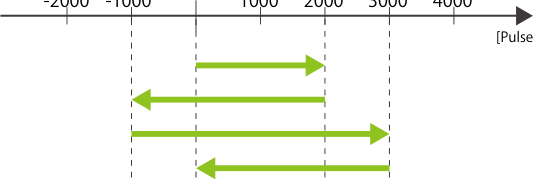
1. Point data registration
P1.1 = 20000
P2.1 = -10000
P3.1 = 30000
P4.1 = 0        // Unit: Pulse

2. Sorting commands (programming)
P1.1            Change to: P2.1
P2.1                       P1.1
P3.1                       P3.1
P4.1                       P4.1
-> Send execution command  (order change = new motion sequence)
8.2 Motion Program
Position data alone does not control the time to the target position. There are 250 acceleration and speed data to set task time. In this example CM3+ moves origin → ① → ② → ③ → ④ with a different speed for each segment; all accelerations are 100 kpps².
// Registration of speed / acceleration data
A1.1= 100
S1.1 = 100
S2.1 = 50
S3.1 = 200
S4.1 = 300     // Acceleration unit: kpps², speed unit: 100 pps (can be changed by K2)

// Command sorting (program)
A1.1,S1.1,P1.1
S2.1,P4.1
S3.1,P2.1
S4.1,P3.1
-> Send execution command
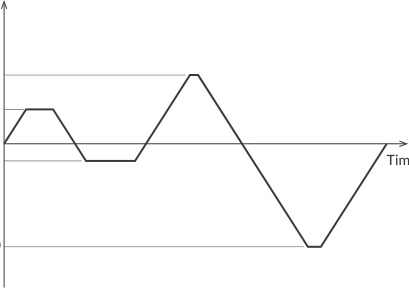
Place commands only where the acceleration/speed changes; if there is no change, they can be omitted.
8.3 Wait Command: T Command
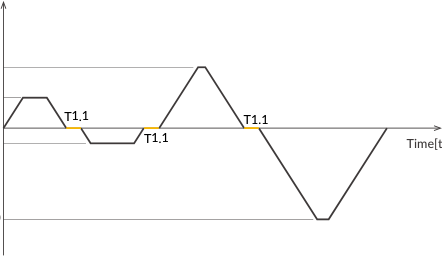
When moving to ② after reaching ①, the rotation direction of the motor changes, which may produce vibration from backlash or inertia of the mechanical device. Vibrations are sometimes amplified and accelerate deterioration of mechanical devices. In such cases, set a waiting time to let the vibration settle. Timer commands can also be set and sorted, or used simply to wait for a certain period.
T1.1= 100      // Unit: msec

A1.1,S1.1,P1.1
T1.1
S2.1,P4.1
T1.1
S3.1,P2.1
T1.1
S4.1,P3.1
-> Send execution command
8.4 Motion Bank Declaration and Modularization
CML consists of four types of commands: execution, setting, query, and program commands. The Bank command (B) starts the definition of a program and can also be used to modularize sequences.
B1.1               // Set the motion sequence in Motion Bank 1 of motor ID1
A1.1,S1.1,P1.1     // Format: B(No).MotorID, No from 1 to 30
T1.1
S2.1,P4.1
T1.1
S3.1,P2.1
T1.1
S4.1,P3.1
END.1              // Set the end of the Motion Bank: END.MotorID
Up to 500 program commands can be set in a Motion Bank, and up to 30 sequence operations can be set.
When setting Motion Banks, set them in ascending order. When sending a Bank command, Banks whose numbers are larger than the number set by the Bank command will be erased. Example: if B4.1 is sent when B1.1 to B10.1 are registered, the Motion Banks after B5.1 will be deleted.
Run / stop modularized Motion Banks
[(Bank No).ID   // Execute the Motion Bank specified by No
].ID            // Pause the currently running Motion Bank
]].ID           // Completely stop the currently running Motion Bank

[2.1            // Execute the sequence set in Bank 2
].1             // Pause Motion Bank
[.1             // Resume the paused Motion Bank
]].1            // Completely stop the running Motion Bank
If Bank 1 is executed, Bank 2 will not be executed automatically after Bank 1 completes. If a paused Motion Bank command is sent while the Motion Bank is completely stopped, Bank No. 1 is executed. If an execution command with a Bank number is sent during a pause, the paused Motion Bank resumes regardless of the Bank number.
Run modular programs in Motion Banks
A Motion Bank number specified in a program can be executed using the C command and J command without executing it from the host device.
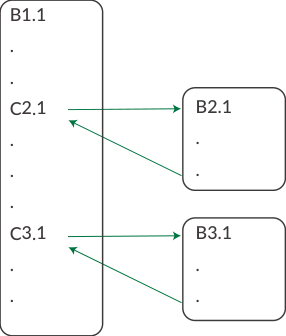
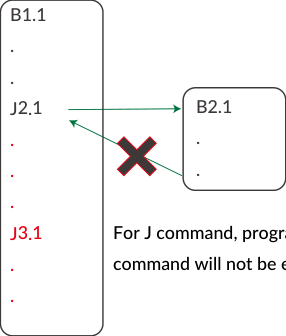
Both C and J commands can call other program numbers during execution. The C command calls a specified Motion Bank then returns to the original Motion Bank after execution. The J command does not return — the Motion Bank is completed when the jumped-to Motion Bank completes, and the program after the jump command is not executed.
It is not possible to call or jump to a Motion Bank of another motor ID using the C or J command. An original Motion Bank cannot be called from within a Motion Bank it called.
8.5 Conditional Branching by Input Signal
You can create conditional branching programs using all input signals in the daisy chain network. The operation is selected by the status of input signals of the specified motor ID.
Format: I[No].ID, [Process 1], [Process 2]    // No is 1 to 4

Example 1:
I3.2, P2.1, P3.2   // If Input 3 of ID2 is on, move ID1 to P2; if off, move ID2 to P3

Example 2:
I2.2, C2.1, C4.1   // Call Motion Bank 2 when Input 2 of ID2 is on; if off, call Motion Bank 4

No action if off:
I3.2, C2.1, T0.1   // Call Motion Bank 2 when Input 3 of ID2 is on; if off, no action

Monitor an input for a period of time:
I3.2, C2.1, W2.1   // W uses the value registered with the T command as waiting time
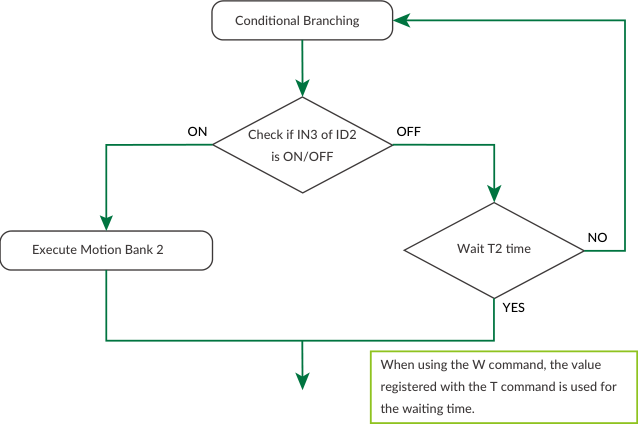
In the last example, if T2.1=100 is set, the status of Input 3 of motor ID2 is monitored 100 times in a 1 msec cycle. If the T command is used instead of the W command, the input signal is checked once, the program waits the set time, then executes the next process.
8.6 Application Example of Motion Bank
The motions shown so far are positioning from the current position to the next position with specified speed and acceleration — PTP (Point To Point) operation. Motions other than PTP are also possible with CM3+ programs.
8.6.1 INC Operation
The data set by the P command is usually absolute position data; it can be used as INC (incremental) operation from the current position by adding "+".
PTP Operation              INC Operation
P1.1= 100000               P1.1= 100000
B1.1                       B1.1
A1.1,S1.1,P1.1             A1.1,S1.1,P1.1+
END.1                      END.1
In PTP operation, CM3+ moves to the 100000 pulse position. In INC operation, CM3+ moves 100000 pulses from the current position in the positive direction each time the bank is executed (P1.1=-100000 moves in the negative direction). Executing the bank 5 times from the origin gives 100000 pulses in PTP but 500000 pulses in INC operation.
8.6.2 Push Motion
Push Motion limits the output torque to the set torque for the set time. It can be used for gripping or press-fitting (see 11.2 Push Motion). Use the Q command instead of the P command; the position data set by P is used as the target position of Q.
P1.1= 100000
B1.1
A1.1,S1.1,Q1.1   // Q command is used instead of P command
END.1
// Q1.1+ makes it INC and Push Motion
8.6.3 Merge Motion
Motion moving through several target positions without decelerating and stopping is called Merge Motion. Writing multiple P commands (same motor ID) on one line creates a Merge Motion.
3-point PTP Motion         3-point Merge Motion
B1.1                       B1.1
A1.1,S1.1,P1.1             A1.1,S1.1,P1.1,P2.1,P3.1
P2.1                       END.1
P3.1
END.1

Merge Motion with different speed / acceleration:
B1.1
A1.1,S1.1,P1.1,P2.1,A2.1,S2.1,Q3.1
END.1
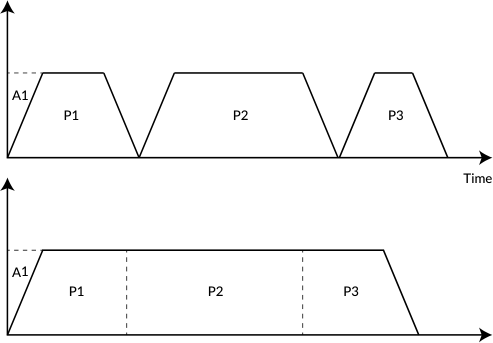
The direction of rotation must be the same in Merge Motion — if not, the motion from where direction changes becomes PTP motion. If A and S commands are placed before a position command in a Merge Motion, acceleration and speed can be changed mid-motion.
8.6.4 Looping Process
The X command executes a looping process. Loops can be nested up to 10 levels.
Format: X(Number of loops).MotorID   // Loop start
        X.MotorID-                   // Loop end

B1.1
X5.1
A1.1,S1.1,P1.1+
X.1-
END.1              // INC motion repeated 5 times

B1.1
X5.1
A1.1,S1.1,P1.1+
X2.1
A2.1,S2.1,P2.1+
X.1-
X.1-
END.1              // P1.1+ executed 5 times, P2.1+ executed 10 times total
The X command can only be used with the motor ID in which the Motion Bank is set.
8.6.5 Multi-axis sequence motion program
A motion sequence program with multiple axes is created almost the same way as a single-axis Motion Bank.
Example 1: Start multiple motors at the same time
B1.1
P1.1,P1.2,P1.3
END.1

Example 2: Start multiple motors one by one
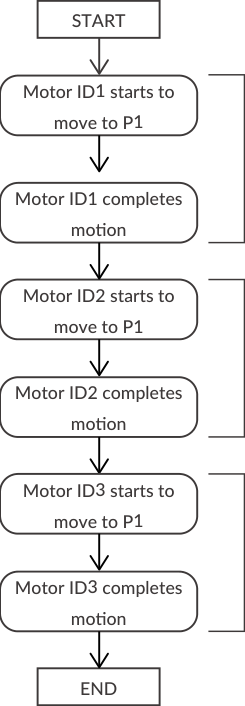
B1.1
P1.1
P1.2
P1.3
END.1
To start multiple motors at the same time, write the P commands on the same line; to start them individually, write them on different lines. When executing motions in a Motion Bank, all CM3+ units on the network must be in In-position status — the next line will not be executed until all motions described in one line are in position and completed.
8.6.6 Before creating a Motion Bank
To perform all the sequences of CM3+ on the network, the operation sequence, execution conditions, etc. must be considered. It is recommended to draw a flowchart or timing chart — this makes test runs and change procedures much smoother.
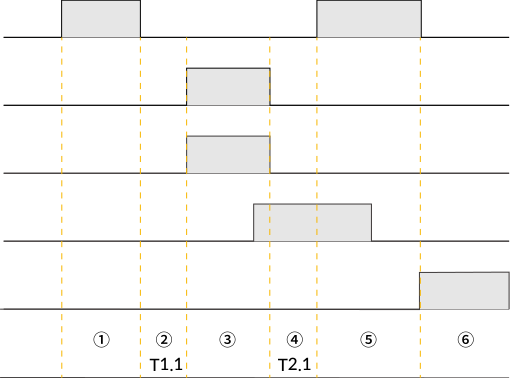
B1.1
A1.1,S1.1,P1.1                  // (1) ID1 move
T1.1                            // (2) Wait for T1 after ID1 completes the motion
A1.2,S1.2,P1.2,A1.3,S1.3,P1.3   // (3) Move IDs 2 and 3 at the same time
I1.2,P2.1,W2.1                  // (4) After ID2 and 3 complete, monitor Input 1 of ID2 for T2 msec.
                                //     If ON, ID1 moves. If off, go to next line.
O2.2                            // (5) After ID1 completes the motion, turn on Output 2 of ID2
END.1