

6.1 Overview
The programming language CML, via RS-232C serial communication, can control CM3+. MUSCLE developed CML based on ASCII code, the most modern character-encoding scheme used for computer and communication devices.
6.2 Operation Mode
CML commands can be used in the following two modes.
Direct Mode
CML commands are used to operate the CM3+ directly. This mode is used to run the CM3+ immediately on the spot, to specify the target position each time, for debugging, or to perform interrupt processing (e.g., speed change or forced termination) while the Motion Bank is running.
Bank Mode
CM3+ operates according to pre-defined operating procedures (bank definition commands). These procedures are written in the memory of the CM3+ and can be executed by execution commands or digital signals.
-
Motion Bank: used to describe a sequence of motions, and to repeat a certain motion.
-
Logic Bank: describes processing linked to input signals and motor status, and is continuously executed in the background at fixed times set by parameters. It is used as a simple sequencer or PLC.
6.3 Memory Map
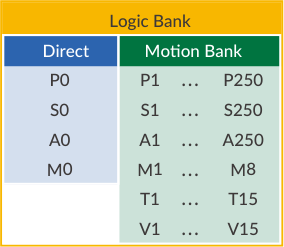
The internal memory of the CM3+ can store various set values. To read or save the stored set values, specify the memory number following the parameter or command.
Data Definition
|
Data |
Range |
|---|---|
|
Position Data |
P0, P1 ... P250 |
|
Speed Data |
S0, S1 ... S250 |
|
Acceleration Data |
A0, A1 ... A250 |
|
Torque Data |
M0, M1 ... M8 |
|
Timer Data |
T1 ... T15 |
|
Variable Data |
V1 ... V15 |
Bank Definition
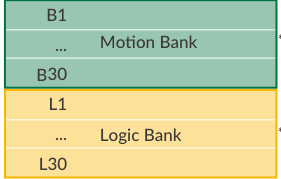
Motion Banks B1...B30 and Logic Banks L1...L30, each with up to 500 commands available.
6.4 CML Command List
CML is composed of parameters, motion data, execution commands and query commands. CML and character codes are shown in the tables below (** means number).
Setting Parameters (Ref: 7.3)
|
Character Code |
Function |
Range |
|---|---|---|
|
K** |
Motion Environmental Parameters |
K1 - K17 |
|
K** |
Origin Detection Parameters |
K22 - K30 |
|
K** |
Gain Adjustment Parameters |
K31 - K36 |
|
K** |
I/O Parameters |
K42 - K60 |
|
K** |
Status Parameters |
K61 - K66 |
|
K** |
Communication Parameters |
K71 - K74 |
|
K** |
Logic Bank Parameters |
K81 - K82 |
|
K** |
Monitoring Parameters |
K85 - K90 |
Execution Commands (Ref: 7.2.1)
|
Character Code |
Function |
Others |
|---|---|---|
|
| |
Origin Detection execution |
|
|
|1 |
Move to origin point |
|
|
|2 |
Set the current position as the origin |
|
|
^ |
Direct mode execution |
|
|
[** |
Execute the specified Motion Bank |
[1 - [30 |
|
$ |
Save bank data |
|
|
) |
Servo Off |
|
|
(1 |
Alarm canceled |
|
|
( |
Servo On |
|
|
O |
Output Signal On |
O1 - O3 |
|
F |
Output Signal Off |
F1 - F3 |
|
] |
Stop command |
|
|
#** |
Position data acquisition (teaching) |
#1 - #249 |
Query Command (Ref: 7.2.2)
|
Character Code |
Function |
|---|---|
|
?** |
Inquiring Current Status |
Motion Commands (Ref: 8.1)
|
Character Code |
Function |
Others |
|---|---|---|
|
S** |
Speed Data |
S1 - S249 |
|
A** |
Acceleration Data |
A1 - A249 |
|
P** |
Position Data |
P1 - P249 |
|
M** |
Torque Data |
M0 - M8 |
|
Y** |
Used instead of P: the next operation is executed without waiting for the positioning to be completed |
Y1 - Y249 |
|
Q** |
Used instead of P: becomes Push Motion |
Q1 - Q249 |
|
Z** |
Used instead of P: the next operation is executed without waiting for the Push Motion to be completed |
Z1 - Z249 |
|
B** |
Start defining Motion Bank |
B1 - B30 |
|
C** |
Call an indicated Motion Bank |
C1 - C30 |
|
J** |
Jump to an indicated Motion Bank |
J1 - J30 |
|
X** |
Repeat |
X0 - X249 |
|
I** |
Conditional branching by input signal |
I1 - I4 |
|
O** |
Output Signal On |
O1 - O3 |
|
F** |
Output Signal Off |
F1 - F3 |
|
T** |
Timer |
T1 - T15 |
|
W** |
Waiting for operation in conditional branch |
W1 - W15 |
|
V** |
Conditional branching, calculation, and data display using general data |
V1 - V15 |
Logic Commands (Ref: 9.1)
|
Character Code |
Function |
Others |
|---|---|---|
|
L** |
Beginning the definition of a Logic Bank |
L1 - L30 |
|
CL** |
Call a specified Logic Bank |
CL1 - CL30 |
|
JL** |
Jump to a specified Logic Bank |
JL1 - JL30 |
|
I** |
Conditional branching by input signal status |
I1 - I4 |
|
T** |
Timer |
T1 - T15 |
|
W** |
Waits for motion in a conditional branch |
W1 - W15 |
|
V** |
Conditional branching, calculation, and data display of general data |
V1 - V15 |
|
END |
End of Logic Bank definition |
- |
|
, (comma) |
Command linking, merge motion, and simultaneous motion |
- |
|
; (semicolon) |
Command linking across multiple lines |
- |
|
: (colon) |
Command linking in branching process |
- |
|
Execution command |
Use of execute command in Logic Bank |
]1, [L, ]L, >, <, }, $, \ unavailable |
Operators
|
Type |
Character Code |
Function |
|---|---|---|
|
Arithmetic |
= |
Assigning values |
|
Arithmetic |
+ |
Addition |
|
Arithmetic |
- |
Subtraction |
|
Arithmetic |
* |
Multiplication |
|
Arithmetic |
/ |
Division |
|
Arithmetic |
U1 |
Sin (Sine) |
|
Arithmetic |
U2 |
Cos (Cosine) |
|
Arithmetic |
U3 |
Square root |
|
Logical |
&& |
Logical conjunction (AND) |
|
Logical |
|| |
Logical OR (OR) |
|
Logical |
!! |
Negation (NOT) |
|
Comparison |
== |
Equal |
|
Comparison |
!= |
Not equal |
|
Comparison |
> |
Greater than |
|
Comparison |
>= |
Greater than or equal to |
|
Comparison |
< |
Less than |
|
Comparison |
<= |
Less than or equal to |