

Open settings with Project › Options. Options belong to Contours itself, not to a project, so they apply whichever project you open.
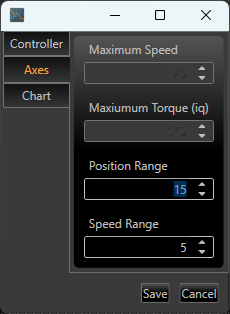
Figure 23. The Options window. Its two cards hold the controller, with the defaults for a new axis under it, and the chart defaults, with Save and Cancel at the foot.
Controller
Select the game controller Contours should use. Only one device can be acquired at a time. The acquired device is shown in the status bar. This is the same choice as the Controller card on each axis's Controller tab (see chapter 6).
Defaults for a new axis
Under the controller, on the same card. These are used for each axis you add; existing axes keep their own settings.
|
Setting |
Default |
Description |
|---|---|---|
|
Position Range |
15 |
Default controller Position Range for new axes (the whole travel). |
|
Speed Range |
5 |
Default controller speed at full deflection for new axes. |
|
Responsiveness Gain |
8 |
How quickly a new axis follows the controller, from 1 to 1024; higher values respond faster. Reset to Default on an axis's Controller tab sets this value (see chapter 6). |
Chart defaults
|
Setting |
Default |
Description |
|---|---|---|
|
Chart length |
36 |
The length of the chart in seconds for a show with no take yet, and when no show is selected. A show with a take is as long as its longest take. |
|
Position Minimum / Maximum |
±12 |
The position range the chart shows for an axis with no take yet, or with a take that doesn't move. |
|
Speed Minimum / Maximum |
±20 |
The same, for speed. The Test tab's Speed chart also starts with this range. |
|
Torque Minimum / Maximum |
±180 |
The range the Test tab's Torque chart starts with. |
Click Save to apply changes, or Cancel to dismiss them. Enter saves, even while you are typing in a box, and Esc cancels.
Note. Contours keeps your options, and the other choices it remembers between sessions, when you install a newer version.