
RSLogix Resources
See Datasheets and Downloads to download the UDTs, AOIs and sample program.
User Data Types
Direct Control Operation
CM1T_Axis
The CM1-T_Axis data type defines how the bytes are assigned withing the IO message.
|
Name |
Data Type |
Description |
|---|---|---|
|
Input |
SINT[36] |
Data coming from the CM1-T |
|
Output |
SINT[28] |
Data going to the CM1-T |
|
us50Counter |
DINT |
Motor 50us counter |
|
ModeOfOperation |
SINT |
Select control mode |
|
ModeOfOperationDisplay |
SINT |
Current control mode |
|
Controlword |
CM1T_Controlword |
Control operation |
|
DriveStatus |
CM1T_DriveStatus |
Drive status |
|
PositionTarget |
DINT |
Target position for position move |
|
SpeedTarget |
DINT |
Max speed for target move |
|
TorqueTarget |
INT |
Max torque for target move |
|
AccelerationTarget |
INT |
Acceleration for target move |
|
DecelerationTarget |
INT |
Deceleration for target move |
|
PositionActual |
DINT |
Actual position of the motor |
|
TargetActual |
DINT |
1ms target position of the motor |
|
PositionError |
DINT |
Error between actual and target |
|
SpeedActual |
DINT |
Actual speed of the motor |
|
CurrentActual |
INT |
Actual current percentage of the motor (0.1% rated) |
|
OverloadActual |
INT |
0.1% of overload torque |
|
DCVoltage |
INT |
24V DC input value at 0.1V |
|
AnalogIN |
INT |
10bit analog input (0-1023) |
|
DigitalIN |
SINT |
Read digital inputs |
|
DigitalOUT |
SINT |
Set digital outputs |
|
Temperature |
SINT |
Drive temperature in °C |
|
ErrorCode |
SINT |
ErrorCode is currently reserved and returns 0.
|
|
ReadAddress1 |
INT |
Address of register to read |
|
ReadValue1 |
DINT |
Value of read register |
|
ReadValueAddress1 |
INT |
Address of the current read register |
|
WriteValue1 |
DINT |
Register write value |
|
WriteRegister1 |
INT |
Write register address |
CM1T_Controlword
|
Name |
Data Type |
Description |
|---|---|---|
|
Start |
BOOL |
Start/New set point |
|
Halt |
BOOL |
Halt current motion |
|
Relative_Move |
BOOL |
Execute position move as relative |
|
Speed_Control |
BOOL |
Execute move as a speed only move |
|
Disable |
BOOL |
Disable the drive |
|
Reset_Error |
BOOL |
Reset error with rising edge |
|
Set_to_Zero |
BOOL |
Set the current position to zero with rising edge |
|
Home |
BOOL |
Home the motor with rising edge |
CM1T_DriveStatus
|
Name |
Data Type |
Description |
|---|---|---|
|
StatusValue |
SINT |
Motor status and error type |
|
StatusValue1 |
SINT |
Additional motor status |
|
In_Position |
BOOL |
Motor is in position and ready to move |
|
Moving |
BOOL |
Motor is currently moving |
|
Disabled |
BOOL |
Drive is disabled |
|
Error |
BOOL |
Drive is in error state |
|
MoveComplete |
BOOL |
Move is completed |
|
NewStartRequired |
BOOL |
Rising edge required to restart motion |
|
HomeAchieved |
BOOL |
Homing has been achieved |
CML Operation
CM1T_CMLAxis
The CM1-T_CMLAxis data type defines how the bytes are assigned withing the IO message.
|
Name |
Data Type |
Description |
|---|---|---|
|
Input |
SINT[60] |
Data coming from the CM1-T |
|
Output |
SINT[44] |
Data going to the CM1-T |
|
us50Counter |
DINT |
Motor 50us counter |
|
DriveStatus |
CM1T_DriveStatus |
Drive status |
|
PositionActual |
DINT |
Actual position of the motor |
|
TargetActual |
DINT |
1ms target position of the motor |
|
PositionError |
DINT |
Error between actual and target |
|
SpeedActual |
DINT |
Actual speed of the motor |
|
CurrentActual |
INT |
Actual current percentage of the motor (0.1% rated) |
|
OverloadActual |
INT |
0.1% of overload torque |
|
DCVoltage |
INT |
24V DC input value at 0.1V |
|
AnalogIN |
INT |
10bit analog input (0-1023) |
|
DigitalIN |
SINT |
Read digital inputs |
|
DigitalOUT |
SINT |
Set digital outputs |
|
Temperature |
SINT |
Drive temperature in °C |
|
ErrorCode |
SINT |
(1) - ErrorCode is currently unused and returns 0. Use MotorStatus to get motor error information |
|
WriteValue |
DINT[5] |
Register write value (array) Address of register to read |
|
ReadValue |
DINT[5] |
Value of read register (array) |
|
WriteAddress |
INT[5] |
Write register address (array) |
|
ReadAddress |
INT[5] |
Read address register (array) |
|
ReadValueAddress |
INT[5] |
Address of the current returned read register (array) |
CM1T_CMLDriveStatus
|
Name |
Data Type |
Description |
|---|---|---|
|
StatusValue |
SINT |
Motor status and error type |
|
StatusValue1 |
SINT |
Additional motor status |
|
In_Position |
BOOL |
Motor is in position and ready to move |
|
Moving |
BOOL |
Motor is currently moving |
|
Disabled |
BOOL |
Drive is disabled |
|
Error |
BOOL |
Drive is in error state |
|
HomeAchieved |
BOOL |
Homing has been achieved |
Add-On Instructions
Direct Control Operation
The following tables outlines the available add-on instructions
|
Name |
Description |
Required |
|---|---|---|
|
CM1T_DataExchange |
Exchanges data between the drive and the drive variable |
Yes |
|
CM1T_Enable |
Enables the motor |
No |
|
CM1T_Disable |
Disables the motor |
No |
|
CM1T_ClearFault |
Clears any faults on the drive |
No |
|
CM1_TControlMode |
Set the type of control mode required |
No |
|
CM1T_MoveAbsolute |
Executes an absolute position move |
No |
|
CM1T_MoveRelative |
Executes a relative position move |
No |
|
CM1T_MoveSpeed |
Executes a speed move |
No |
|
CM1T_MoveTorque |
Executes a torque move |
No |
|
CM1T_MoveHome |
Executes a home routine |
No |
|
CM1T_ReadRegister |
Read a motor register value |
No |
|
CM1T_WriteRegister |
Write a value to a motor register |
No |
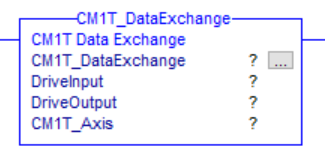
CM1T_DataExchange
This AOI is required if any other AOIs are used. One instance is required for each CM1-T axis being controlled.
It has a number of functions
-
It exchanges data between the motor connections and the motor/drive tag.
-
It places the Controlword bits into the Controlword data type
-
It retrieves the drive status and places it into the DriveStatus variable.
Parameters
|
Operand |
Type |
Format |
Description |
|---|---|---|---|
|
CM1T_DataExchange |
CM1T_DataExchange |
Tag |
Instance tag for the AOI |
|
DriveInput |
AB:ETHERNET_MODULE_SINT_32Bytes:I:0 |
Tag |
Module defined connection input for the CM1-T |
|
DriveOutput |
AB:ETHERNET_MODULE_SINT_20Bytes:O:0 |
Tag |
Module defined connection output for the CM1-T |
|
CM1T_Axis |
CM1T_Axis |
Tag |
Working tag for the CM1-T axis |
Execution
|
Condition |
Action |
|---|---|
|
Prescan |
|
|
Rung Condition - TRUE |
|
|
Rung Condition - FALSE |
N/A - rung-condition-out is set to false |
CM1T_Enable
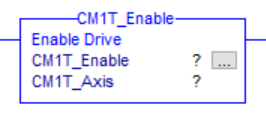
This AOI enables the motor and drive. Torque will be present.
Parameters
|
Operand |
Type |
Format |
Description |
|---|---|---|---|
|
CM1T_Enable |
CM1T_Enable |
Tag |
Instance tag for the AOI |
|
CM1T_Axis |
CM1T_Axis |
Tag |
Working tag for the CM1-T axis |
Execution
|
Condition |
Action |
|---|---|
|
prescan |
N/A - rung-condition-out is set to false |
|
rung-condition-in is true |
|
|
rung-condition-in is false |
N/A - rung-condition-out is set to false |
CM1T_Disable
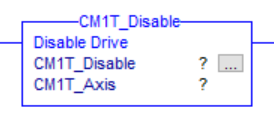
This AOI disables the motor and drive. Torque will not be present
Parameters
|
Operand |
Type |
Format |
Description |
|---|---|---|---|
|
CM1T_Disable |
CM1T_Disable |
Tag |
Instance tag for the AOI |
|
CM1T_Axis |
CM1T_Axis |
Tag |
Working tag for the CM1-T axis |
Execution
|
Condition |
Action |
|---|---|
|
prescan |
N/A - rung-condition-out is set to false |
|
rung-condition-in is true |
|
|
rung-condition-in is false |
N/A - rung-condition-out is set to false |
CM1T_ClearFault
This AOI clears any drive fault/error condition. This will also enable the motor. The rung-out-condition indicates the drive error state (true or false).
Parameters
|
Operand |
Type |
Format |
Description |
|---|---|---|---|
|
CM1T_ClearFault |
CM1T_ClearFault |
Tag |
Instance tag for the AOI |
|
CM1T_Axis |
CM1T_Axis |
Tag |
Working tag for the CM1-T axis |
Execution
|
Condition |
Action |
|---|---|
|
Prescan |
N/A |
|
rung-condition-in is true |
|
|
rung-condition-in is false |
|
CM1T_ControlMode
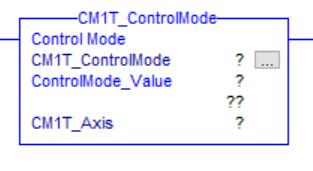
This AOI set the motion control mode.
Parameters
|
Operand |
Type |
Format |
Description |
|---|---|---|---|
|
CM1T_Disable |
CM1T_ControlMode |
Tag |
Instance tag for the AOI |
|
CM1T_Axis |
CM1T_Axis |
Tag |
Working tag for the CM1-T axis |
|
ControlMode_Value |
DINT |
Immediate/Tag |
A value that sets the type of control mode required 0 - POSITION
|
Execution
|
Condition |
Action |
|---|---|
|
prescan |
N/A - rung-condition-out is set to false |
|
rung-condition-in is true |
|
|
rung-condition-in is false |
N/A - rung-condition-out is set to false |
CM1T_MoveAbsolute
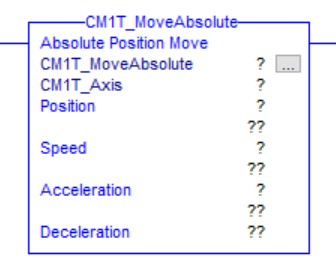
This AOI will execute an absolute position move.
Parameters
|
Operand |
Type |
Format |
Description |
|---|---|---|---|
|
CM1T_MoveAbsolute |
CM1T_MoveAbsolute |
Tag |
Instance tag for the AOI |
|
CM1T_Axis |
CM1T_Axis |
Tag |
Working tag for the CM1-T axis |
|
Position |
DINT |
Immediate/
|
Target absolute position |
|
Speed |
DINT |
Immediate/
|
Target speed |
|
Acceleration |
INT |
Immediate/
|
Target acceleration |
|
Deceleration (optional) |
INT |
Immediate/
|
Target deceleration
|
Execution
|
Condition |
Action |
|---|---|
|
prescan |
N/A - rung-condition-out is set to false |
|
rung-condition-in is true |
|
|
rung-condition-in is false |
N/A - rung-condition-out is set to false |
CM1T_MoveRelative
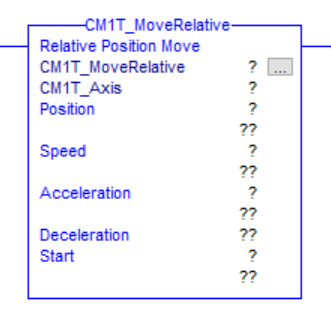
This AOI will execute a relative position move.
Parameters
|
Operand |
Type |
Format |
Description |
|---|---|---|---|
|
CM1T_MoveRelative |
CM1T_MoveRelative |
Tag |
Instance tag for the AOI |
|
CM1T_Axis |
CM1T_Axis |
Tag |
Working tag for the CM1-T axis |
|
Position |
DINT |
Immediate/
|
Target absolute position |
|
Speed |
DINT |
Immediate/
|
Target speed |
|
Acceleration |
INT |
Immediate/
|
Target acceleration |
|
Deceleration (optional) |
INT |
Immediate/
|
Target deceleration
|
|
Start |
BOOL |
Immediate/
|
0 → 1 transition will execute a new relative move. If a motion is currently in process it will increment relative to the current position |
Execution
|
Condition |
Action |
|---|---|
|
prescan |
N/A - rung-condition-out is set to false |
|
rung-condition-in is true |
|
|
rung-condition-in is false |
N/A - rung-condition-out is set to false |
CM1T_MoveSpeed
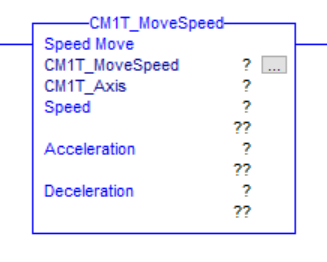
This AOI will execute a speed move.
Parameters
|
Operand |
Type |
Format |
Description |
|---|---|---|---|
|
CM1T_MoveSpeed |
CM1T_MoveSpeed |
Tag |
Instance tag for the AOI |
|
CM1T_Axis |
CM1T_Axis |
Tag |
Working tag for the CM1-T axis |
|
Speed |
DINT |
Immediate/
|
Target speed |
|
Acceleration |
INT |
Immediate/
|
Target acceleration |
|
Deceleration (optional) |
INT |
Immediate/
|
Target deceleration
|
Execution
|
Condition |
Action |
|---|---|
|
prescan |
N/A - rung-condition-out is set to false |
|
rung-condition-in is true |
|
|
rung-condition-in is false |
N/A - rung-condition-out is set to false |
CM1T_MoveTorque
This AOI will execute a torque move.
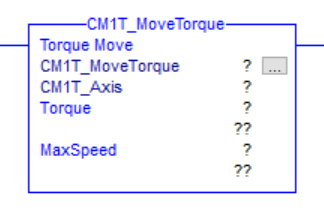
Parameters
|
Operand |
Type |
Format |
Description |
|---|---|---|---|
|
CM1T_MoveSpeed |
CM1T_MoveSpeed |
Tag |
Instance tag for the AOI |
|
CM1T_Axis |
CM1T_Axis |
Tag |
Working tag for the CM1-T axis |
|
Torque |
INT |
Immediate/
|
Target torque |
|
MaxSpeed |
DINT |
Immediate/
|
Target speed |
Execution
|
Condition |
Action |
|---|---|
|
prescan |
N/A - rung-condition-out is set to false |
|
rung-condition-in is true |
|
|
rung-condition-in is false |
N/A - rung-condition-out is set to false |
CM1T_ReadRegister
This AOI loads a register address to read. It returns the register value. The value is returned when the ReadRegister (output) address and the ReadValueAddress (input) address are equal.
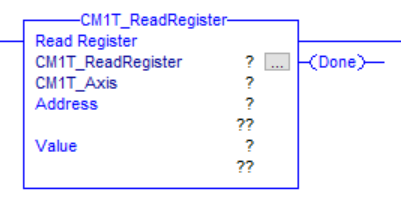
Parameters
|
Operand |
Type |
Format |
Description |
|---|---|---|---|
|
CM1T_ReadRegister |
CM1T_ReadRegister |
Tag |
Instance tag for the AOI |
|
CM1T_Axis |
CM1T_Axis |
Tag |
Working tag for the CM1-T axis |
|
Address |
INT |
Immediate/
|
Address of register to read |
|
Value |
DINT |
Tag |
Tag to load the returned value |
|
Done |
BOOL |
Tag |
Optional output indicating the value has been returned. |
Execution
|
Condition |
Action |
|---|---|
|
prescan |
N/A - rung-condition-out is set to false |
|
rung-condition-in is true |
|
|
rung-condition-in is false |
N/A - rung-condition-out is set to false |
CM1T_WriteRegister
This AOI loads a register address and value to write. Once the write cycle is complete the done output is set.
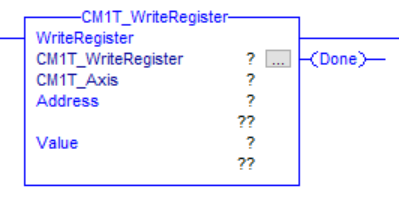
Parameters
|
Operand |
Type |
Format |
Description |
|---|---|---|---|
|
CM1TWriteRegister |
CM1T_WriteRegister |
Tag |
Instance tag for the AOI |
|
CM1T_Axis |
CM1T_Axis |
Tag |
Working tag for the CM1-T axis |
|
Address |
INT |
Immediate/
|
Address of register to write |
|
Value |
DINT |
Immediate/
|
Tag/value to load into the write value |
|
Done |
BOOL |
Tag |
Optional output indicating the value has been written. |
Execution
|
Condition |
Action |
|---|---|
|
prescan |
N/A - rung-condition-out is set to false |
|
rung-condition-in is true |
|
|
rung-condition-in is false |
N/A - rung-condition-out is set to false |
CML Operation
The following tables outlines the available add-on instructions
|
Name |
Description |
Required |
|---|---|---|
|
CM1T_CMLDataExchange |
Exchanges data between the drive and the drive variable |
Yes |
|
CM1T_CMLReadRegister |
Reads a motor register |
No |
|
CM1T_CMLWriteRegister |
Writes to a motor register |
No |
CM1T_CMLDataExchange
This AOI is required if any other CML AOIs are used. One instance is required for each CM1-T axis being controlled.
It has a number of functions
-
It exchanges data between the motor connections and the motor/drive tag.
-
It retrieves the drive status and places it into the DriveStatus variable.
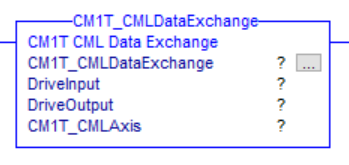
Parameters
|
Operand |
Type |
Format |
Description |
|---|---|---|---|
|
CM1T_DataExchange |
CM1T_DataExchange |
Tag |
Instance tag for the AOI |
|
DriveInput |
AB:ETHERNET_MODULE_SINT_32Bytes:I:0 |
Tag |
Module defined connection input for the CM1-T |
|
DriveOutput |
AB:ETHERNET_MODULE_SINT_20Bytes:O:0 |
Tag |
Module defined connection output for the CM1-T |
|
CM1T_Axis |
CM1T_Axis |
Tag |
Working tag for the CM1-T axis |
Execution
|
Condition |
Action |
|---|---|
|
Prescan |
N/A - rung-condition-out is set to false |
|
Rung Condition - TRUE |
|
|
Rung Condition - FALSE |
N/A - rung-condition-out is set to false |
CM1T_CMLReadRegister
This AOI loads a register address to read. It returns the register value. The value is returned when the ReadRegister (output) address and the ReadValueAddress (input) address are equal.
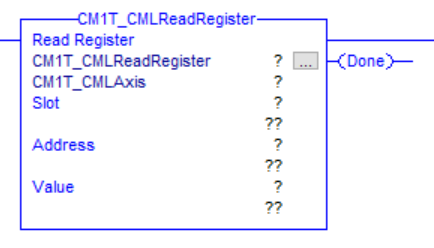
Parameters
|
Operand |
Type |
Format |
Description |
|---|---|---|---|
|
CM1T_ReadRegister |
CM1T_ReadRegister |
Tag |
Instance tag for the AOI |
|
CM1T_Axis |
CM1T_Axis |
Tag |
Working tag for the CM1-T axis |
|
Slot |
SINT |
Immediate/
|
There are 5 slots available. Enter 1-5. |
|
Address |
INT |
Immediate/
|
Address of register to read |
|
Value |
DINT |
Tag |
Tag to load the returned value |
|
Done |
BOOL |
Tag |
Optional output indicating the value has been returned. |
Execution
|
Condition |
Action |
|---|---|
|
prescan |
N/A - rung-condition-out is set to false |
|
rung-condition-in is true |
|
|
rung-condition-in is false |
N/A - rung-condition-out is set to false |
CM1T_CMLWriteRegister
This AOI loads a register address and value to write. Once the write cycle is complete the done output is set.
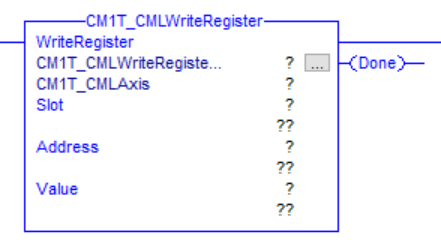
Parameters
|
Operand |
Type |
Format |
Description |
|---|---|---|---|
|
CM1TWriteRegister |
CM1T_WriteRegister |
Tag |
Instance tag for the AOI |
|
CM1T_Axis |
CM1T_Axis |
Tag |
Working tag for the CM1-T axis |
|
Slot |
SINT |
Immediate/
|
There are 5 slots available. Enter 1-5. |
|
Address |
INT |
Immediate/
|
Address of register to write |
|
Value |
DINT |
Immediate/
|
Tag/value to load into the write value |
|
Done |
BOOL |
Tag |
Optional output indicating the value has been written. |
Execution
|
Condition |
Action |
|---|---|
|
prescan |
N/A - rung-condition-out is set to false |
|
rung-condition-in is true |
|
|
rung-condition-in is false |
N/A - rung-condition-out is set to false |
Adding CM1-T and AOIs to Project
Download and extract the EtherNet/IP support file.
The file includes the following
-
Direct Control Operation
-
CM1T_SampleApplication.ACD - This a sample application built RSLogix. It shows how to
-
Run the motors in each of the modes
-
Reset from faults
-
Enable/Disable the motor
-
-
User Data Types (UDT)
-
Add-On Instructions (AOI)
-
-
CML Operation
-
CM1T_CMLSampleApplication.ACD - RSLogix application to read/write motor registers
-
CM1T_CMLSampleApplication.crp - Control Room project with CML sample program.
-
Executes incremental move if variable is set (Run, distance, speed and acceleration set from PLC)
-
Increments counter variable (Variable read in PLC)
-
-
User Data Types (UDT)
-
Add-On Instructions (AOI)
-
Direct Control Operation
Import User Data Types (UDTs)
The following steps show how to import the UDTs used by the CM1-T module.
-
Right click on Data Types → User-Defined and select "Import Data Type..."
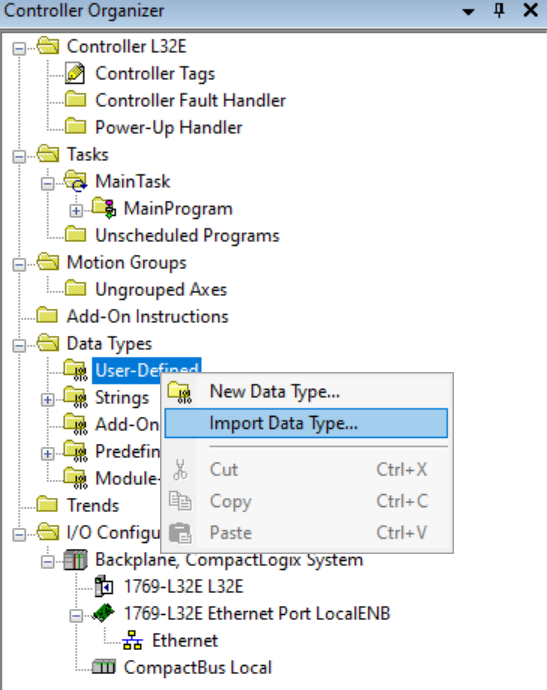
-
Browse to the location where the CM1T_AOI support file was extracted. Select the CM1T_Axis and click import.
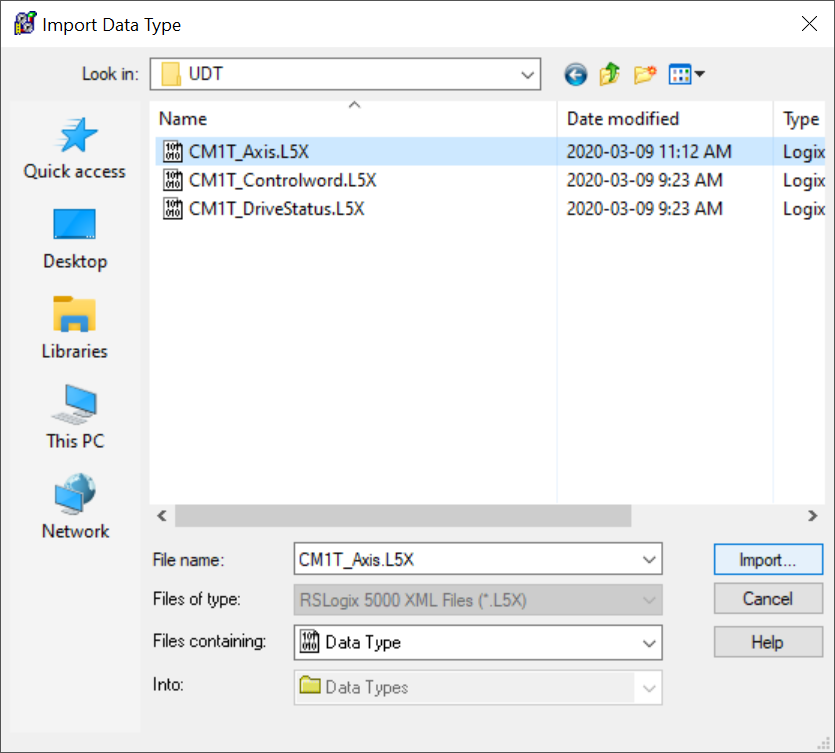
-
On the Import Configuration window click OK
-
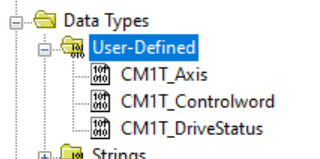
The CM1T_Axis, CM1T_Controlword and CM1T_DriveStatus should all have been import as shown below. If they were not repeat steps 1-3 with the CM1T_Controlword and CM1T_DriveStatus.
Import Add-On Instructions (AOIs)
The following steps show how to import the CM1-T modules AOIs. The only required AOI is CM1T_DataExchange. All the other AOIs depend on this one to populate the data type.
-
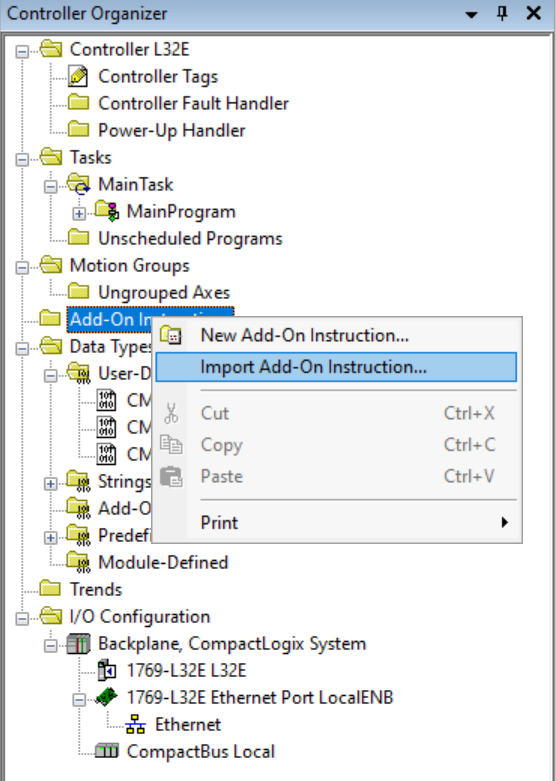
Right click on Add-On Instructions and select "Import Add-On Instruction..."
-
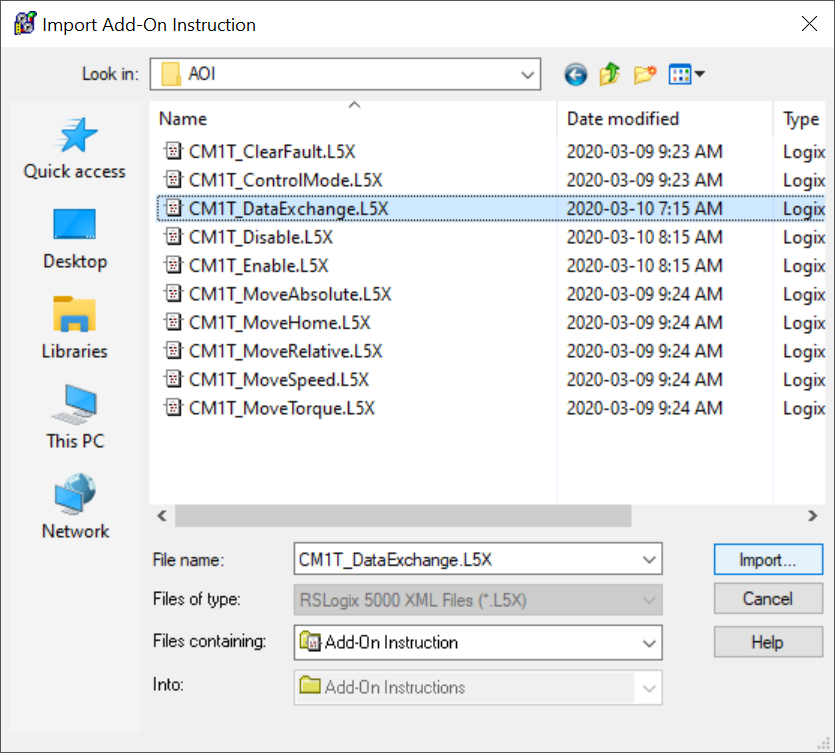
Browse to the extracted AOI folder and select CM1T_DataExchange. Click Import
-
On the Configuration Import window click OK.
-
Repeat steps 1-3 until all required AOIs are imported
-
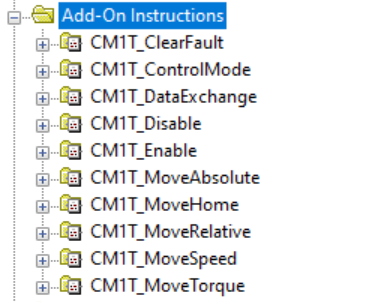
The Add-On Instruction tree will look as follows once all AOIs are imported
Add CM1-T Module
The following steps show how to add an CM1-T module in RSLogix. At present the EtheNet/IP is in testing and the CM1-T is added a a generic module.
-
Open an existing project or start a new one
-
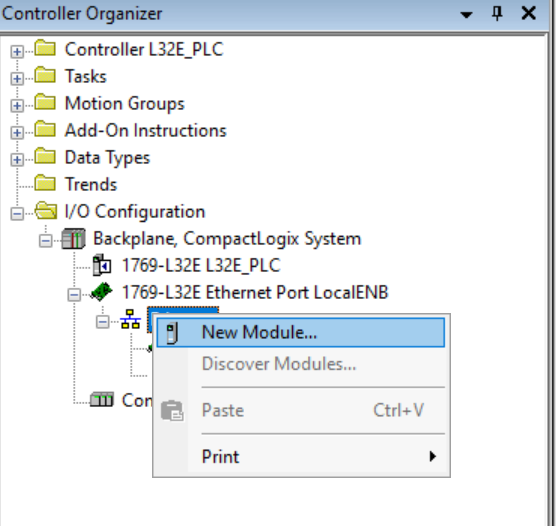
In the Controller Organizer expand I/O Configuration and right click on "Ethernet". Select "New Module"
-
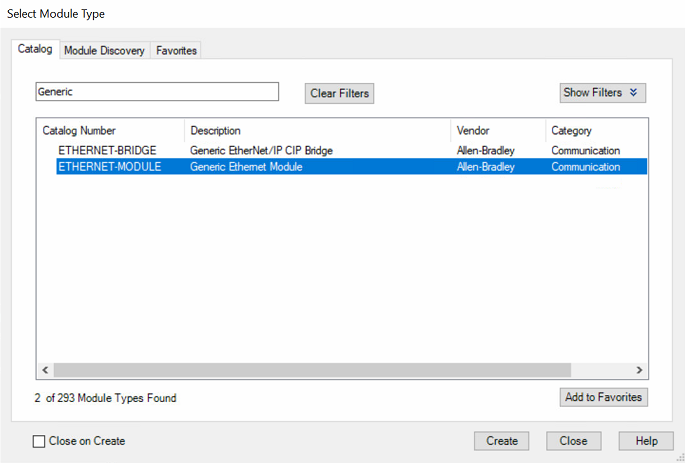
Search "Generic", Select "ETHERNET-MODULE" and click Create
-
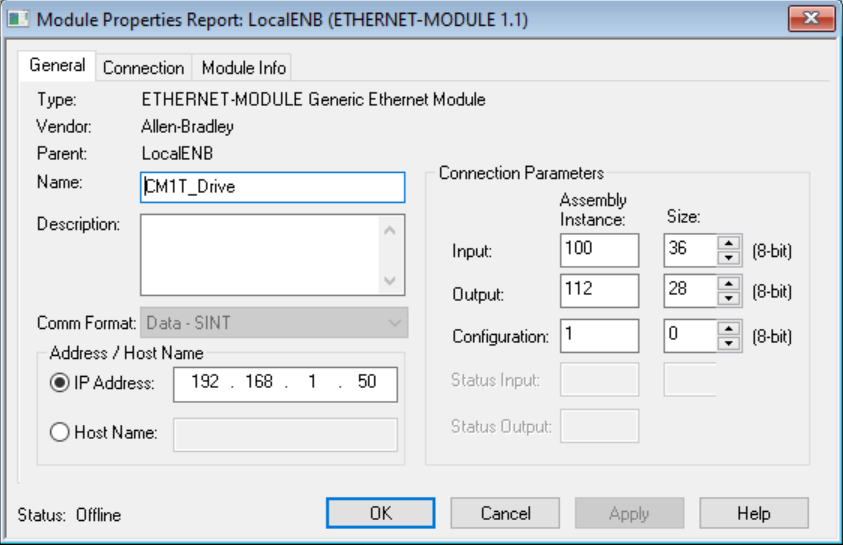
Fill in the following properties shown below
-
Name: Give the drive a name. E.g. CM1T_Drive, Axis1, LabelXAxis, etc
-
Comm Format: Data - SINT
-
IP Address: Enter the IP Address of the CM1-T you are adding.
-
Connection Parameters
-
Input: Assembly Instance = 100, Size = 36
-
Output: Assembly Instance = 112, Size = 28
-
Configuration: Assembly Instance = 1, Size = 0
-
-
Click OK
-
-
The Module Properties window should open. If it does not double click on the newly created module inside the Ethernet heading.
Select the Connection Tab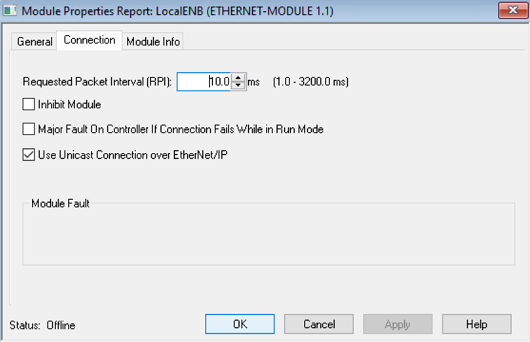
-
Set the packet interval as required. Typically this would be 10ms.
-
Check the boxes as shown in the picture above
-
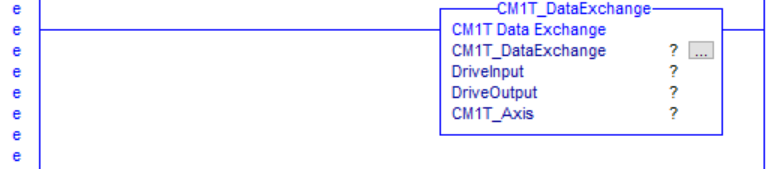
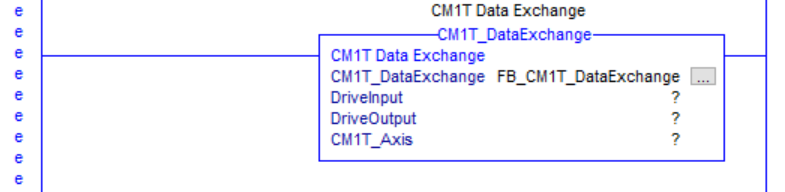
The final set of steps below shows how to add the CM1T_DataExchange AOI and configure it to exchange data between the tag created for the CM1-T and the CM1-T module. A single instance of the CM1T_DataExchange should be created per module. There should never be more than one per module.
-
Add the CM1T_DataExchange AOI to a rung
-
Create a CM1T_DataExchange Tag and attached it to this instance. In this example it is called FB_CM1T_DataExchnage
-
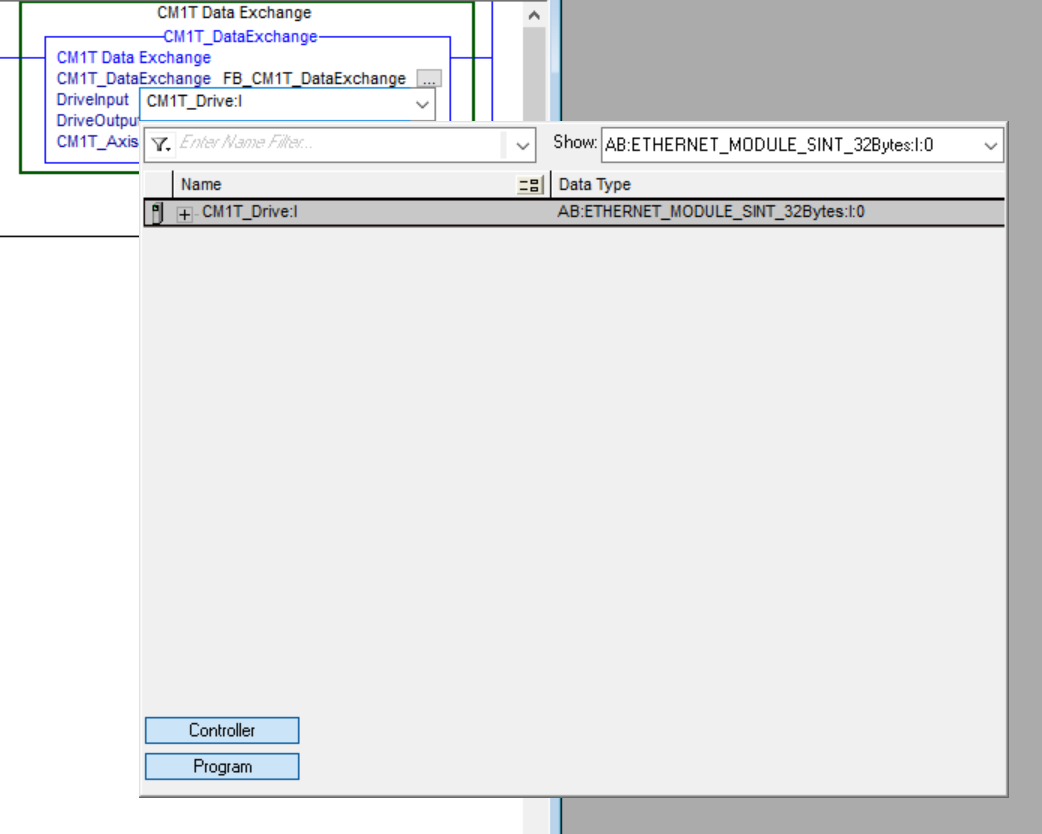
Expand the DriveInput drop down menu and select the CM1T_Drive module input create earlier
-
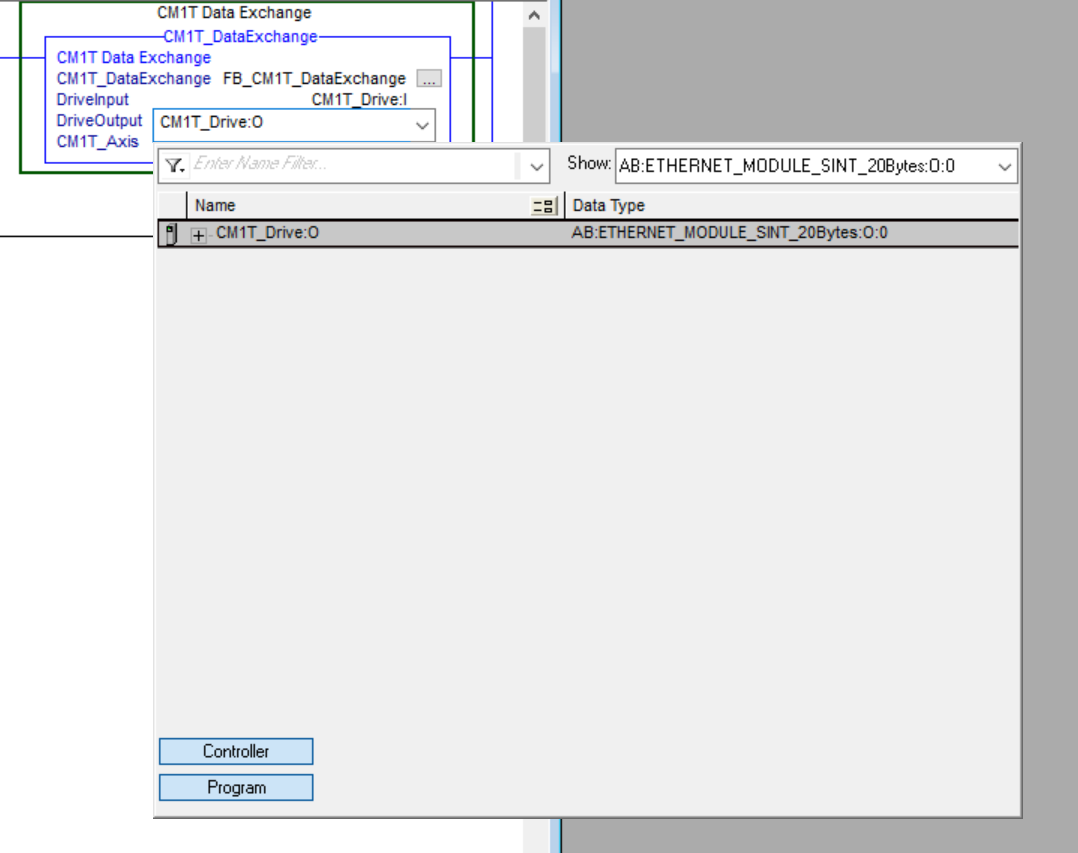
Expand the DriveOuput drop down menu and select the CM1T_Drive module output create earlier
-
Create a new CM1T_Axis tag and attach it to the instruction. This is the tag that will be used in all other AOIs
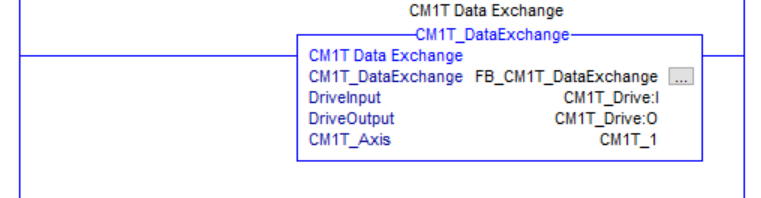
All CM1-T AOIs are now ready to be used. See the example application for more details on running the motor.
Example Logic - Direct Control Operation Sample
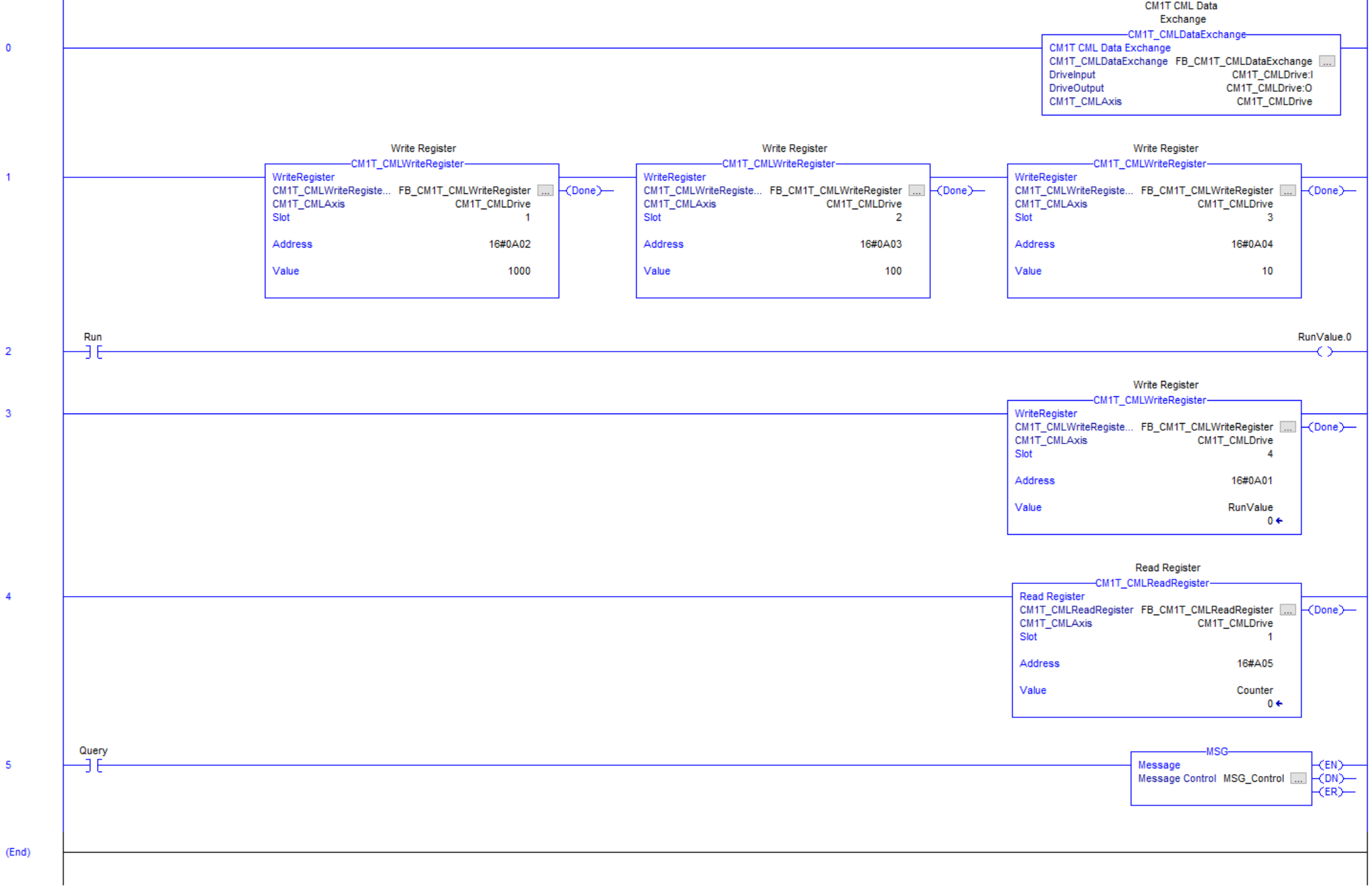
The following logic is from the Direct operation sample application. The example shows how to run the motor in each of the modes, enable, disable, halt, and recover from an error.
Unknown Attachment
CML Operation
Import User Data Types (UDTs)
Following the instructions for Direct Control Operation except import
-
CM1T_CMLAxis
-
CM1T_CMLDriveStatus
Import Add-On Instructions (AOIs)
Follow the instructions for Direct Control Operation except import
-
CM1T_CMLDataExchange
-
CM1T_CMLReadRegister
-
CM1T_CMLWriteRegister
Add CM1-T Module
Follow the instructions for Direct Control Operation except on step 4 enter the following configuration data
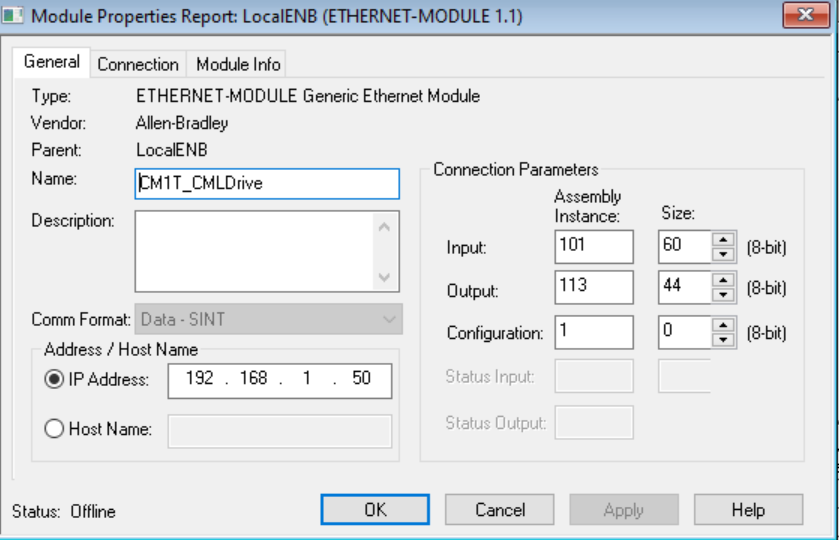
-
Name: Give the drive a name. E.g. CM1T_Drive, Axis1, LabelXAxis, etc
-
Comm Format: Data - SINT
-
IP Address: Enter the IP Address of the CM1-T you are adding.
-
Connection Parameters
-
Input: Assembly Instance = 101, Size = 60
-
Output: Assembly Instance = 113, Size = 44
-
Configuration: Assembly Instance = 1, Size = 0
-
-
Click OK
Example Logic - CML Operation Sample
The following sample logic is supplied with the AOIs. It requires the motor to be programmed with a CML program. The program does the following
-
Motor indexes continuously by the distance amount defined by PLC
-
Motor indexes with speed and acceleration defined by PLC
-
Indexing is started and stopped by PLC
-
A counter showing number of indexes is read by the PLC