

Basic Math Functions
Both program and logic banks allow for the following mathematical operations:
|
Operation |
Format |
Description |
|
= |
P1.1=P2.1+V1.1 |
Equals. Sets P1.1 to the result of the following operation |
|
+ |
P1.1=P2.1+V1.1 |
Addition. Sets P1.1 to the sum of P2.1 and V1.1 |
|
- |
P1.1=P2.1-V1.1 |
Subtraction. Sets P1.1 to the difference of P2.1 and V1.1 |
|
* |
P1.1=P2.1*V1.1 |
Multiplication. Sets P1.1 to the product of P2.1 and V1.1 |
|
/ |
P1.1=P2.1/V1.1 |
Division. Sets P1.1 to the quotient of P2.1 and V1.1 |
Advanced Math Functions
In addition to the above basic math functions, there are some advanced math functions available as well:
U1
|
Sine
|
|
This function will calculate the sine of the operand. 
The functions is scaled such that: 
|
|
|
|
This bank will set speed S1 to the sine of V1. V1 is then incremented. The bank is then looped indefinitely. |
U2
|
Cosine
|
|
This function will calculate the cosine of the operand. 
The functions is scaled such that: 
|
|
|
|
This bank will set speed S1 to the cosine of V1. V1 is then incremented. The bank is then looped indefinitely. |
U3
|
Square Root
|
|
This function will calculate the square root of the operand. 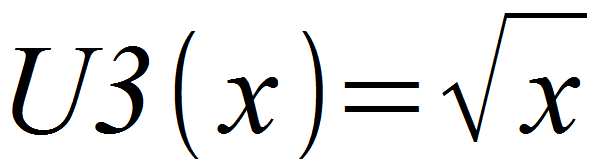
The value returned by this function is an integer value. For example √7=2. For higher accuracy it is suggested to scale the solution by orders of 10. |
|
|
|
Position one is equal to position two plus the square root of variable one. |
U4
|
Absolute Value
|
|
This function returns the absolute value (magnitude) of the operand. The returned value is an integer. For example, U4(-25) returns 25 and U4(25) returns 25. |
|
|
|
Variable one is set to the absolute value of variable two. With V2.1=-2, V1.1 becomes 2. |