

Introduction
The attached example shows how to execute a point-to-point move with the Cool Muscle. The code will work for both a CM1 and CM2. It uses a standard serial port connection to the motor and executes the direct move commands. The following CML is used
-
P0 - Target position
-
S0 - Target speed
-
A0 - Target acceleration
-
M0 - % Peak torque
-
^ - Start move
-
] - Stop move
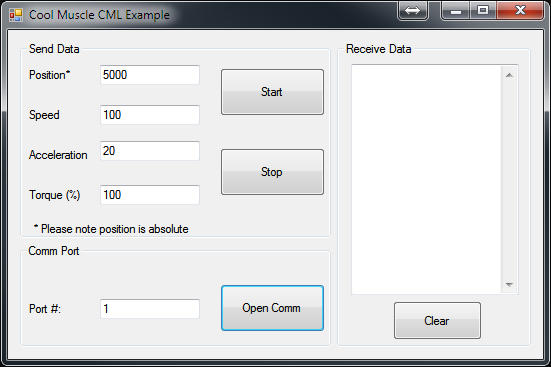
Code
The following code shows the key start and stop function
Start Function
C#
        private void button_Start_Click(object sender, EventArgs e)
        {
            /* Run the motor using the dynamic move structure
             * Set P0, S0, A0 and M0. Then start the motor with the ^ command
             * We assume a single motor in this example so use the .1 ID
             * P, S, A and M are separated with a comma (,)
             * All instructions must be appended with a carriage return
             */

            String sSend;

            sSend = "P0.1=" + textBox_Position.Text +
                    ",S0.1=" + textBox_Speed.Text +
                    ",A0.1=" + textBox_Acceleration.Text +
                    ",M0.1=" + textBox_Torque.Text +
                    "\r";

            //write the registers data
            serialPort.Write(sSend);

            //start the motor
            serialPort.Write("^.1\r");

        }
Stop Function
C#
        private void button_Stop_Click(object sender, EventArgs e)
        {
            /* Stop the motor with the ] command.
             * We assume a single motor in this example so use the .1 ID
             * All commands must be appended with a carriage return
             */

            serialPort.Write("].1\r");
        }